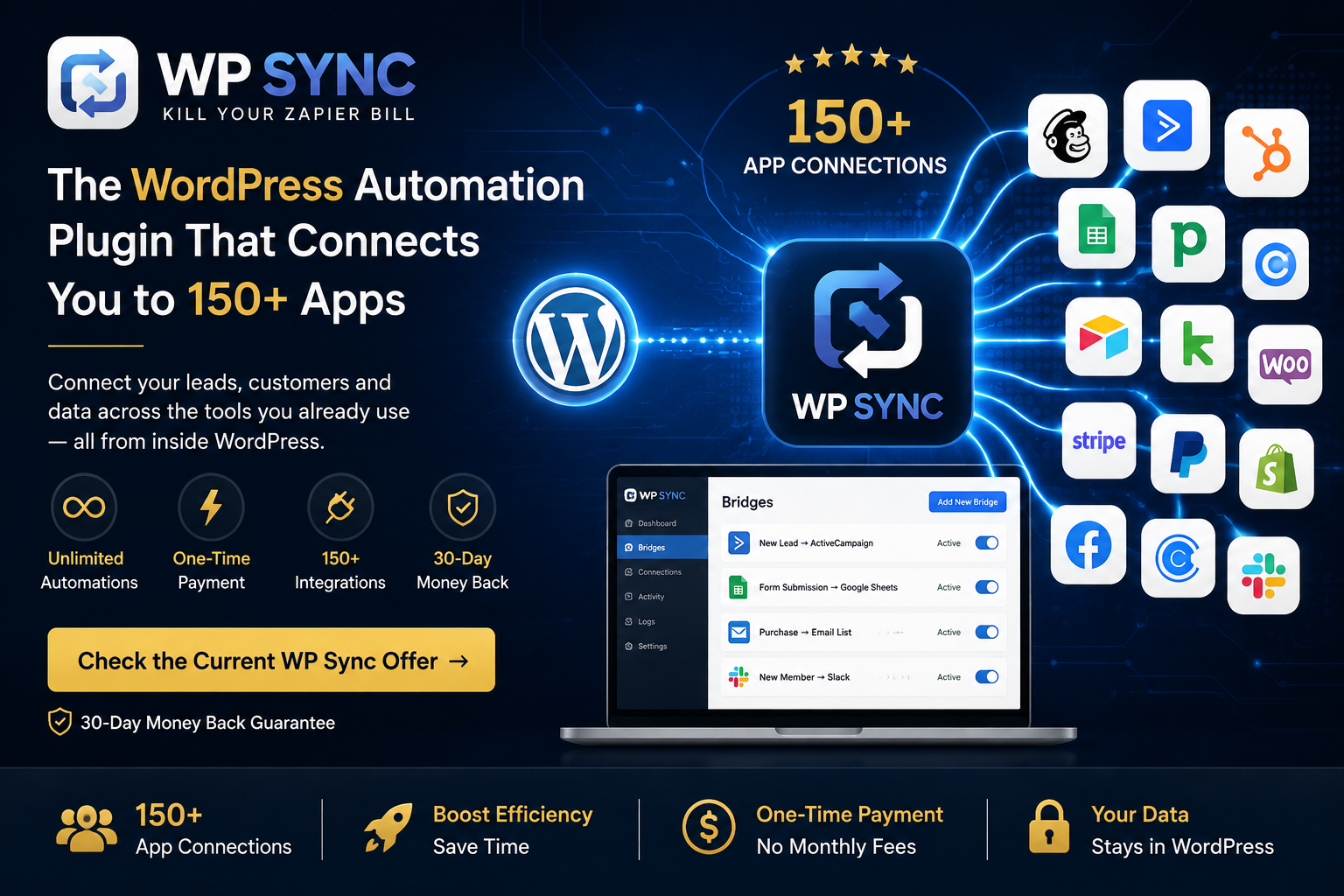
The central idea is straightforward: instead of paying a recurring fee to an external automation platform, WP Sync runs inside your WordPress environment and lets you create connections between supported applications.
The current launch material advertises 150+ app connections, unlimited automations, a one-time payment during the launch period and no task meter.
But is it actually a good alternative to Zapier?
That depends on what you need your automation system to do.
In this WP Sync review, we'll look at the features, integrations, pricing, advantages, limitations and who should — and should not — consider using it.
What Is WP Sync?
WP Sync is a WordPress plugin created by Kevin Fahey that allows users to synchronize information between supported applications.
Instead of manually moving information from one platform to another, you create an automation — referred to in the product material as a bridge — between a source and a destination.
For example:
- New lead → Email platform
- New purchase → Email list → CRM → Google Sheets
The official documentation describes WP Sync as being capable of connecting autoresponders, forms, checkout platforms, webinars, stores, lead ads, calendars, team communication tools and other services.
The plugin is designed to operate inside WordPress, rather than requiring the automation itself to live on a separate SaaS platform.
How Does WP Sync Work?
The basic concept is relatively simple.
You select:
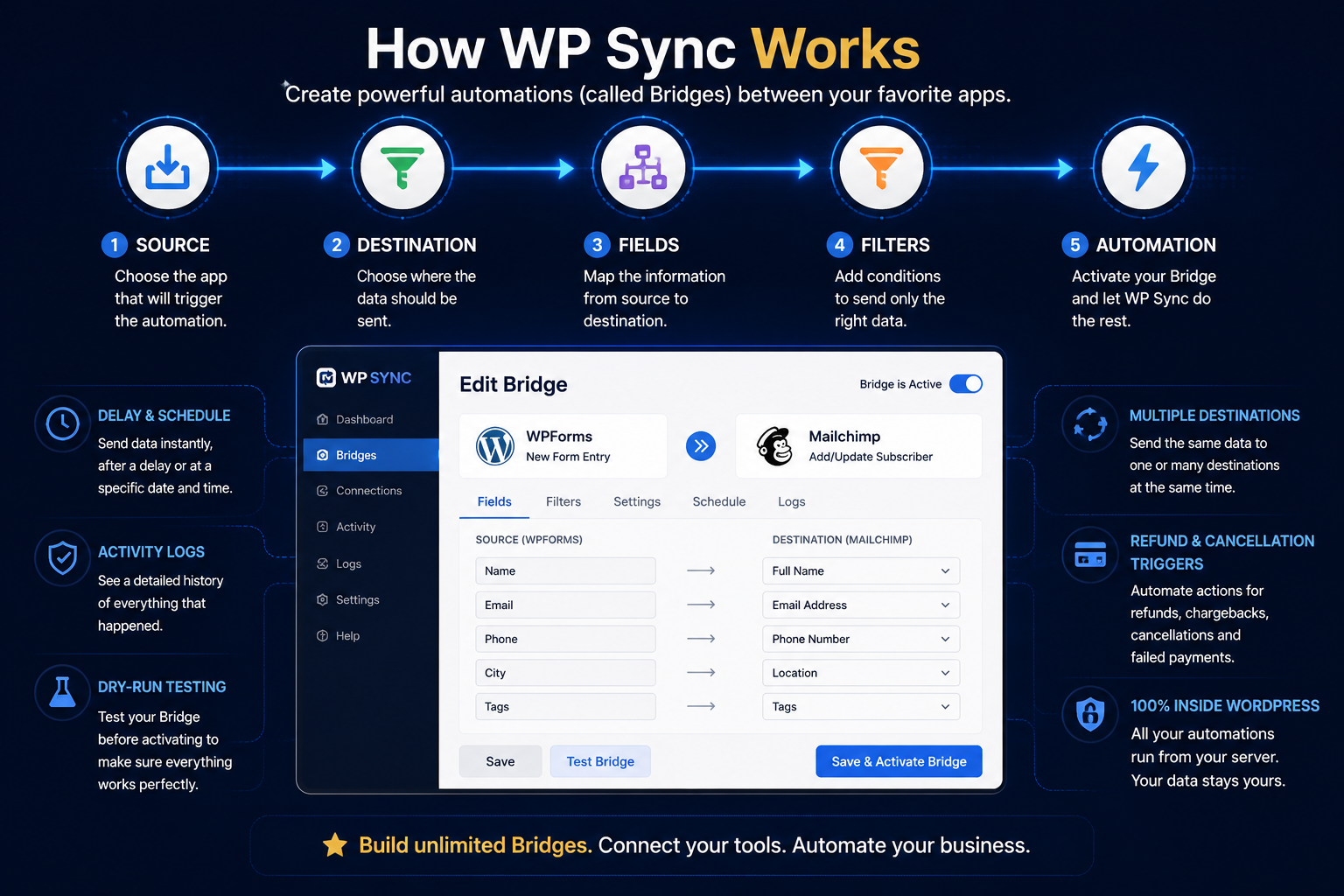
For example, suppose someone fills out a form on your website.
You could configure a connection that sends that person's information to your email marketing platform.
The official material states that users can also configure:
- Field mapping
- Filters
- Multiple destinations
- Delays
- Scheduling
- Activity logs
- Dry-run testing
- Refund and cancellation triggers
These capabilities are documented in the product's feature section.
This makes WP Sync particularly interesting for businesses that repeatedly move contacts between the same collection of tools.
WP Sync Features
150+ App Connections
Email marketing, CRM, forms, e-commerce, payments, courses, memberships, webinars, calendars, lead generation, team communication and communities.
Unlimited Automations
The official material states that WP Sync does not use the traditional task meter found in many automation platforms.
Field Mapping and Filters
Map fields between source and destination and apply filtering conditions, so you control what information is transferred and where.
Scheduling and Delays
Send information immediately, after a delay or at a specified date and time.
Activity Logs
Activity logging lets users see what happened with their synchronizations, which helps when troubleshooting an unexpected result.
Refund and Cancellation Triggers
The official material mentions refunds, chargebacks, cancellations and failed payments as possible triggers.
1. 150+ App Connections
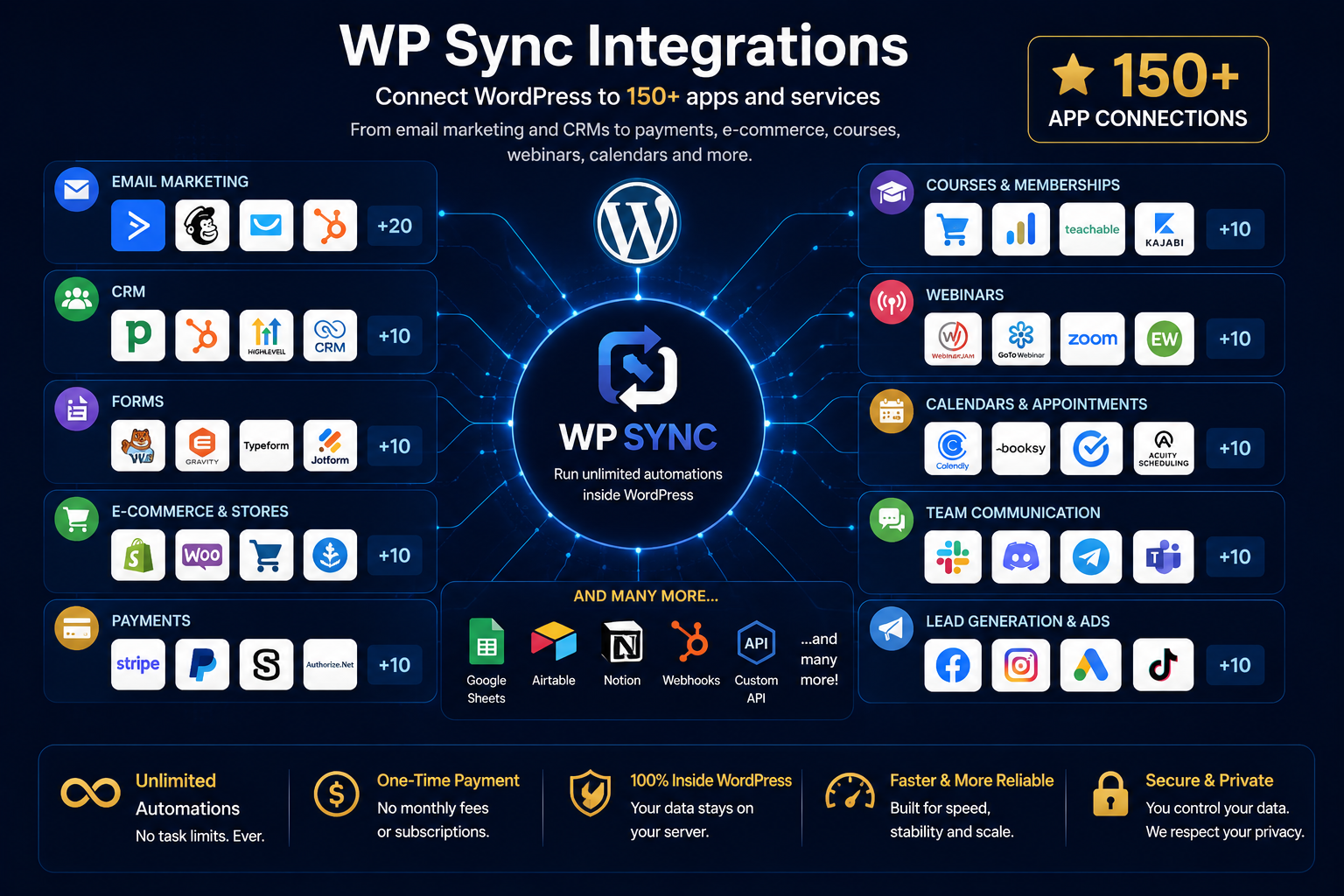
One of the biggest selling points is the number of supported integrations.
The official JV material lists connections across several categories, including:
- Email marketing
- CRM
- Forms
- E-commerce
- Payments
- Courses
- Memberships
- Webinars
- Calendars
- Lead generation
- Team communication
- Communities
Examples include ActiveCampaign, Mailchimp, GetResponse, HubSpot, GoHighLevel, Google Sheets, Airtable, Notion, Shopify, WooCommerce, Stripe, PayPal, Calendly, Facebook Lead Ads, Slack, Discord and Telegram.
That's a significant integration library for a WordPress plugin.
2. Unlimited Automations
The official material states that WP Sync does not use the traditional task meter found in many automation platforms.
The product specifically promotes unlimited automations without charging more as contact volume increases.
For someone running several recurring automations, this can make the cost structure easier to understand.
3. Field Mapping and Filters
Another useful feature is the ability to control how information moves between platforms.
You can map fields between the source and destination and apply filtering conditions.
That matters because different platforms often use different field structures.
Instead of simply sending everything everywhere, you can determine what information should be transferred and where it should go.
4. Scheduling and Delays
WP Sync also supports scheduled or delayed actions.
According to the official documentation, users can choose to send information immediately, after a delay or at a specified date and time.
This gives the system more flexibility than a basic one-direction synchronization tool.
5. Activity Logs
The product includes activity logging so users can see what happened with their synchronizations.
For businesses relying on automated lead movement, having a record of activity is useful when troubleshooting an unexpected result.
6. Refund and Cancellation Triggers
One interesting feature is support for events beyond a simple purchase.
The official material specifically mentions refunds, chargebacks, cancellations and failed payments as possible triggers.
That could be useful for businesses that need to automatically update lists or customer records when a transaction changes status.
WP Sync vs. Zapier
This is probably the biggest question potential buyers will have.
WP Sync is positioned directly against the recurring-cost model used by services such as Zapier.
The official pitch emphasizes that WP Sync is installed on WordPress and uses a one-time payment during the launch instead of charging based on automation tasks.
But there is an important distinction:
| Criteria | WP Sync | Task-based platforms (e.g. Zapier) |
|---|---|---|
| Where it runs | Inside your WordPress installation | External SaaS platform |
| Billing model | One-time payment during the launch | Recurring subscription |
| Task metering | Marketed without a task meter | Typically billed per task |
| Integrations | 150+ connections advertised | Very large ecosystem |
| Complex workflows | Best suited to contact synchronization between supported apps | Multi-step workflows and branching |
| Maintenance | You maintain WordPress and hosting | Maintained by the vendor |
If your business needs sophisticated multi-step workflows, complex branching, extensive error-handling infrastructure or a very large ecosystem of integrations, you should compare the actual workflow requirements before switching.
The right question isn't simply:
The better question is:
That's the comparison that matters.
WP Sync Pricing
At the time of the current launch, the official JV material lists the following structure:
| Offer | Price | Commission structure |
|---|---|---|
| WP Sync Core | $47 | 50% |
| WP Sync Bundle — 150+ connections | $147 | 50% |
| WP Sync Reseller | $200 | 50% |
| Developer — Core / Pro / Entire | $297 / $397 / $497 | 50% |
The official material states that the launch offer includes 50% commissions across the funnel.
Which package makes the most sense?
That depends on the buyer.
- Core — $47: Better suited to someone who primarily needs the basic autoresponder connections.
- Bundle — $147: More interesting for users who need the broader integration library.
- Developer: More relevant to agencies, freelancers or businesses managing multiple WordPress installations.
The official material says the Developer option supports up to 25 sites.
WP Sync Developer License: Is the 25-Site Upgrade Worth It?
For users managing more than one WordPress site, WP Sync also offers a Developer License designed to extend the plugin across up to 25 websites.
This is not a separate automation platform. It is a multi-site licensing upgrade for WP Sync, aimed primarily at agencies, developers, site flippers, multi-brand operators and other users who need the same automation setup across multiple WordPress installations.
Instead of purchasing separate licenses for individual sites, the Developer License allows the selected WP Sync tier to be activated across as many as 25 sites.
WP Sync Developer License Pricing
There are three Developer options:
| Developer Plan | One-Time Price | Site Limit | What It Includes |
|---|---|---|---|
| Core Developer | $297 | 25 sites | Core features and 35 autoresponders |
| Pro Developer | $397 | 25 sites | Core Developer plus 12 Pro connectors |
| Entire Developer | $497 | 25 sites | Core + Pro plus the broader 150+ connection library |
All three are presented as one-time purchases rather than recurring per-site subscriptions.
At full 25-site usage, that works out to approximately:
- Core Developer: $11.88 per site
- Pro Developer: $15.88 per site
- Entire Developer: $19.88 per site
Of course, those per-site figures only become meaningful if you actually intend to use the license across multiple websites.
What Does the Pro Developer Plan Include?
The $397 Pro Developer option includes the Core Developer functionality plus a selection of additional connectors.
According to the current offer, these include tools and integrations involving Webhooks, forms, Zoom, Google Sheets, ClickUp, GoToWebinar, Pipedrive, Trello, Airtable, Notion and monday.com.
The important distinction is that this license extends those capabilities across up to 25 sites.
Who Is the Developer License Best For?
The Developer License makes the most sense for people who actively manage multiple WordPress installations.
That could include:
- agencies managing client websites;
- developers maintaining multiple projects;
- marketers operating several brands;
- site flippers;
- businesses running separate WordPress properties;
- operators who regularly build new WordPress sites.
For these users, paying once for multi-site access may be considerably more practical than purchasing separate licenses repeatedly.
Who Should Skip the Developer Upgrade?
If you only operate one WordPress website, there is little reason to pay several hundred dollars simply to obtain capacity you are unlikely to use.
The regular WP Sync license is likely the more sensible choice for a single-site owner.
The same applies if you are unsure whether you will actually deploy WP Sync across multiple websites. A lower theoretical cost per site does not automatically make the Developer License a better purchase if most of the 25 available activations remain unused.
Is WP Sync Pro Developer Worth $397?
For the right user, potentially yes.
The $397 Pro Developer plan is particularly interesting for someone who needs the additional Pro integrations and expects to use WP Sync across several websites.
For a single-site user, however, it would be difficult to justify the upgrade based purely on licensing capacity.
This makes the Developer License less of a universal upgrade and more of a specialized option:
- Single website: stick with the regular WP Sync license.
- Several websites requiring the Pro integrations: Pro Developer becomes much more compelling.
- Large portfolio requiring the widest integration library: Entire Developer may offer better coverage.
Ultimately, the value depends less on the headline "25 sites" and more on how many of those sites you will realistically use.
Pros and Cons
Pros
- WordPress-based — the system operates inside WordPress rather than requiring the automation itself to be hosted on a separate platform.
- Large integration library — the official documentation lists more than 150 connections across numerous categories.
- No task meter — the offer is designed around unlimited automations rather than charging according to the number of tasks performed.
- Field mapping and filtering — useful for more precise data synchronization.
- Scheduling and delays — allows users to control when information is delivered.
- One-time launch pricing — the current launch offers are presented as one-time payments.
- 30-day guarantee — the official JV material lists a 30-day refund guarantee.
Cons
- It requires WordPress. If you don't use WordPress, this isn't the right type of solution.
- Integration availability matters. Having 150+ connections sounds impressive, but what matters to you is whether your specific tools are supported.
- You are responsible for your WordPress environment: hosting, WordPress configuration and site maintenance remain part of the equation.
- Not every automation problem is the same. A simple contact synchronization is very different from a complicated multi-step business workflow.
- The launch pricing is time-sensitive. The official material states that the launch period runs through August 15 and that the pricing structure changes afterward.
Therefore, anyone reading this review later should verify the current price before purchasing.
Who Is WP Sync Best For?
WP Sync makes the most sense for:
Affiliate marketers
Especially those using WordPress together with email marketing platforms, affiliate networks, forms and tracking systems.
Course creators
For example:
E-commerce businesses
For example:
Agencies
Especially agencies managing several WordPress websites.
WordPress users tired of recurring automation costs
If your automation needs are relatively straightforward and your primary goal is reducing recurring software expenses, WP Sync is worth investigating.
Who Should Probably Skip WP Sync?
I would be more cautious if:
- You don't use WordPress.
- Your automation requirements are extremely complex.
- You need a platform-independent automation system.
- Your business depends on very sophisticated workflow logic.
- Your required application isn't supported.
- You aren't comfortable maintaining a WordPress-based solution.
In those situations, a traditional automation platform may still make more sense.
Is WP Sync Worth It?
For the right WordPress user, yes.
The strongest part of WP Sync isn't simply the claim that it can replace Zapier.
It's the combination of:
The official documentation also provides a fairly extensive list of supported platforms, which makes the product much more than a basic email-to-email connector.
However, I wouldn't recommend buying it simply because the sales page says it can "kill your Zapier bill."
The sensible approach is to first check whether your exact applications and workflows are supported.
If they are, the economics become much more attractive.
Final Verdict
WP Sync is an interesting WordPress automation solution with a very clear value proposition.
It won't be the right replacement for every Zapier or Make user, but for WordPress-based businesses that primarily need reliable contact synchronization between supported applications, it offers a compelling alternative to recurring task-based automation costs.
The 150+ integration library, unlimited automations and WordPress-based architecture are its strongest advantages.
Recommended for
WordPress-based affiliate marketers, course creators, e-commerce businesses and agencies whose required integrations are supported.
Not recommended for
Non-WordPress users, businesses with very complex workflow logic, or anyone whose required application isn't supported.
The main thing I would recommend before purchasing is simple: check your required integrations first. If your tools are supported and your workflows fit what WP Sync was designed to do, the current offer deserves serious consideration.
FAQ
Does WP Sync work with WordPress?
Yes. It is designed as a WordPress-based automation solution.
How many applications does WP Sync support?
The official material currently advertises 150+ connections.
Does WP Sync charge per task?
The product is marketed without a task meter, allowing unlimited automations under the offer.
What is the launch price?
The official JV documentation lists the Core offer at $47 and the 150+ connection bundle at $147 during the launch.
Does WP Sync offer a refund?
The official material states a 30-day refund guarantee.
Can WP Sync completely replace Zapier?
Not necessarily. It depends on the applications and complexity of your workflows. It is best evaluated according to the specific automations you need.
Check WP Sync
Verify the current offer and confirm that your required integrations are supported before purchasing.